

In the Shopify Theme Editor, choose Theme settings > Product badges, edit the setting. Change appears in the preview. Click Save to publish it.
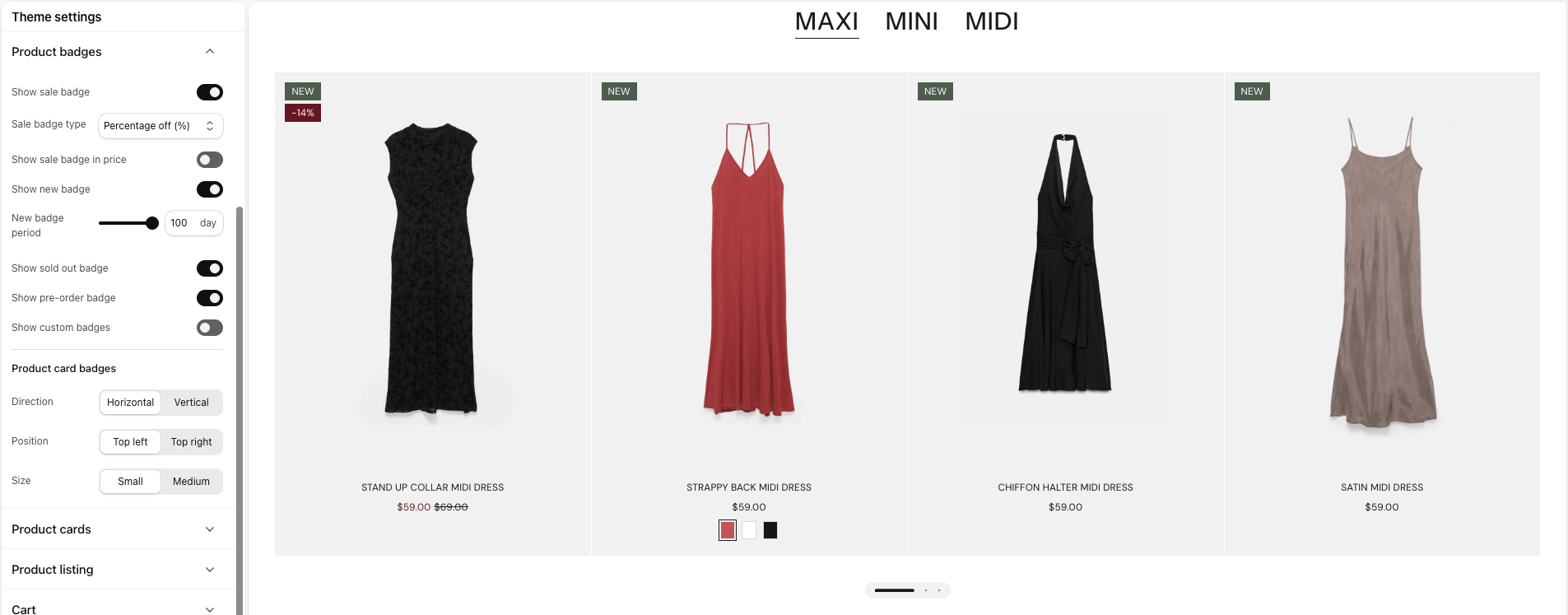
Sale badge
- Show sale badge: Enable sale badge.
- Sale badge type: Sets what the badge displays when the sale badge is on:
- Sale text
- Percentage off (%)
- Amount off
- Show sale badge in price: Shows the discount badge directly next to the price.
New badge
- Show new badge: Enable new badge.
- New badge period: How long after a product is created the New badge continues to display, ranging from 1–100 days.
Sold out & pre-order badges
- Show sold out badge: Enable sold out badge.
- Show pre-order badge: Enable pre-order badge.
Custom badges
- Show custom badges: Enable custom badges.
- Custom badge source: Choose where the custom badge label comes from: Tag or Metafield.
- Badge tag prefix:
- When the source is Tag, set:
- Text field: Any product tag starting with this prefix becomes a badge. Example: badge:Best seller.
- When the source is Metafield, set:
- Badge metafield namespace: Enter the metafield namespace. Example: custom.
- Badge metafield key: Enter the metafield key. Example: badge.
- When the source is Tag, set:
Product card badges
Control how badges are displayed on the product card when more than one badge is present.- Direction: Set whether multiple badges stack vertically or line up horizontally. Choose Vertical or Horizontal.
- Position: Set where badges appear on the product image: Top left or Top right.
- Size: Set the badge size: Small or Medium.