

In the Shopify Theme Editor, choose Theme settings > Typography, edit settings. Changes appear in the preview. Click Save to publish them.
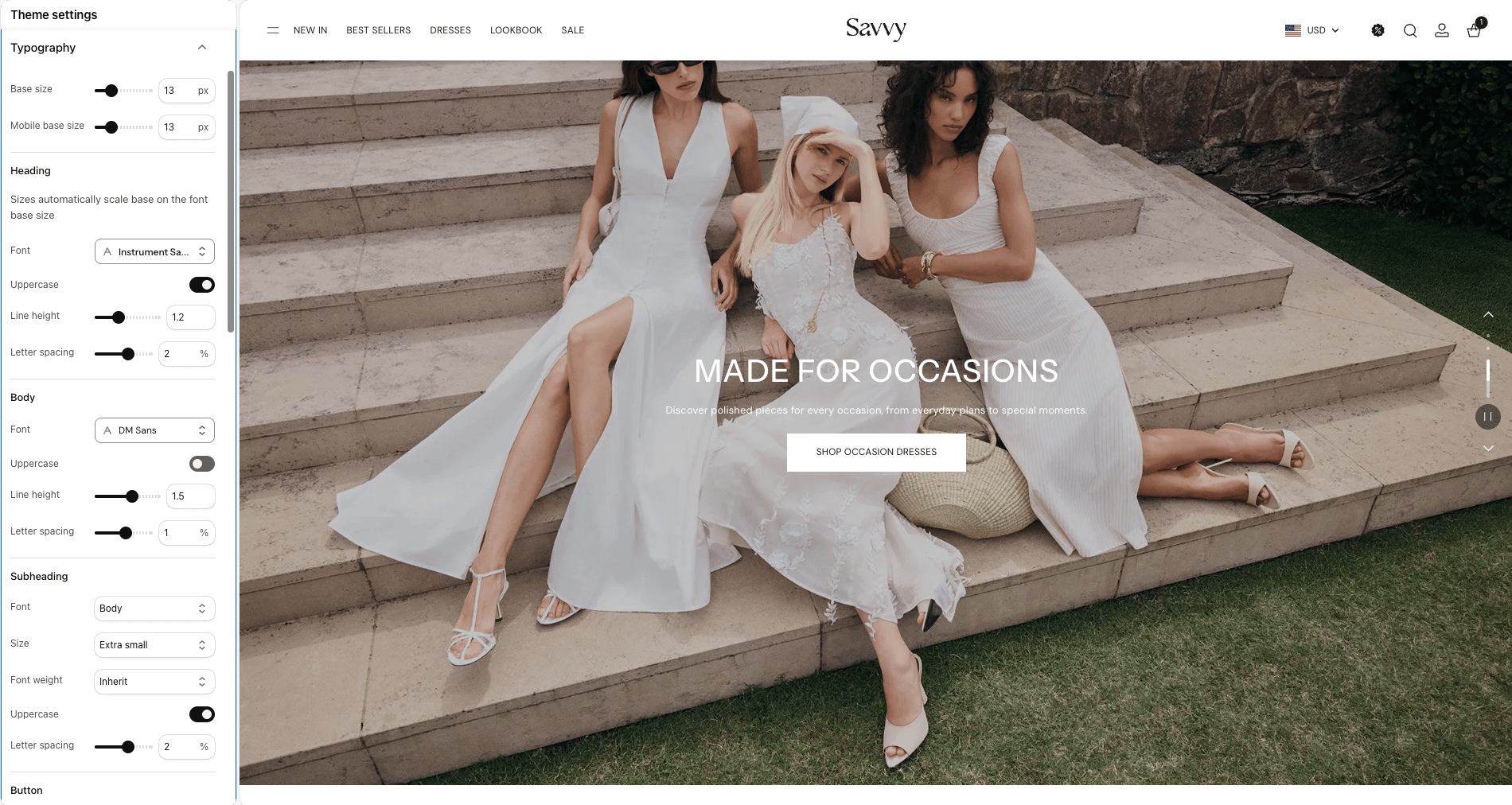
Base size
The foundational font size the whole typography system scales from — it’s not a text role itself, but the multiplier that determines how large every heading level renders.- Base size: Set the base font size all heading sizes scale from, ranging from 11–20px.
- Mobile base size: Set the base font size all heading sizes scale from, for mobile only, ranging from 11–20px.
Heading
Heading sizes scale automatically from the base size, so you don’t have to set each heading level individually.- Font: Set the font used for headings.
- Uppercase: Display heading text in uppercase.
- Line height: Set height between lines, ranging from 0.8–2.
- Letter spacing: Set space between letter, ranging from -10% to 10%.
Body
- Font: Set the font used for body text.
- Uppercase: Display body text in uppercase. When selected, all body text display in uppercase except text content in blog post page.
- Line height: Set height between lines, ranging from 0.8–2.
- Letter spacing: Set space between letter, ranging from -10% to 10%.
Subheading
- Font: Choose the font of the subheading that is the same as the font of Body or Heading set above, or Other. If Other, select a custom font.
- Size: Choose the size for subheading. Available options:
- Extra small
- Small
- Medium
- Medium large
- Large
- Extra large
- 2X large
- 3X large
- Font weight: Choose font weight.
- Inherit: Inherit from the font weight of the body font.
- Light
- Regular
- Medium
- Semibold
- Bold
- Uppercase: Displays subheading in uppercase.
- Letter spacing: Set space between letter, ranging from -10% to 10%.
Button
- Font: Choose the font of the button label that is the same as the font of Body or Heading set above.
- Font weight: Choose font weight.
- Inherit: Inherit from the font weight of the body font.
- Light
- Regular
- Medium
- Semibold
- Bold
- Uppercase: Displays button label in uppercase.
- Letter spacing: Set space between letter, ranging from -10% to 10%.
Product card title
- Font: Choose the font of the product card title that is the same as the font of Body or Heading set above.
- Font weight: Choose font weight.
- Inherit: Inherit from the font weight of the body font.
- Light
- Regular
- Medium
- Semibold
- Bold
- Uppercase: Displays product card title in uppercase.
- Letter spacing: Set space between letter, ranging from -10% to 10%.
Product card price
- Font: Choose the font of the product card price that is the same as the font of Body or Heading set above.
- Font weight: Choose font weight.
- Inherit: Inherit from the font weight of the body font.
- Light
- Regular
- Medium
- Semibold
- Bold
- Letter spacing: Set space between letter, ranging from -10% to 10%.
Product badges
- Font: Choose the font of the product badges that is the same as the font of Body or Heading set above.
- Font weight: Choose font weight.
- Inherit: Inherit from the font weight of the body font.
- Light
- Regular
- Medium
- Semibold
- Bold
- Uppercase: Displays product badges in uppercase.
- Letter spacing: Set space between letter, ranging from -10% to 10%.
Header top-level menu
- Font: Choose the font of the header top-level menu that is the same as the font of Body or Heading set above.
- Size: Choose the size for header top level menu. Available options:
- Extra small
- Small
- Medium
- Medium large
- Large
- Font weight: Choose font weight.
- Inherit: Inherit from the font weight of the body font.
- Light
- Regular
- Medium
- Semibold
- Bold
- Uppercase: Displays header top-level menu in uppercase.
- Letter spacing: Set space between letter, ranging from -10% to 10%.